The CRM that runs your
whole business, not just sales.
Contacts, pipeline, email & SMS campaigns, quotes, invoicing, and support on one record — configured and administered for you, with your data in storage you own.
The product
Built around how a sales day actually goes.
Pipeline, activities, and the customer record are the three screens your team lives in. They're designed to be worked, not administered.
Pipeline
A pipeline your team will actually keep up to date.
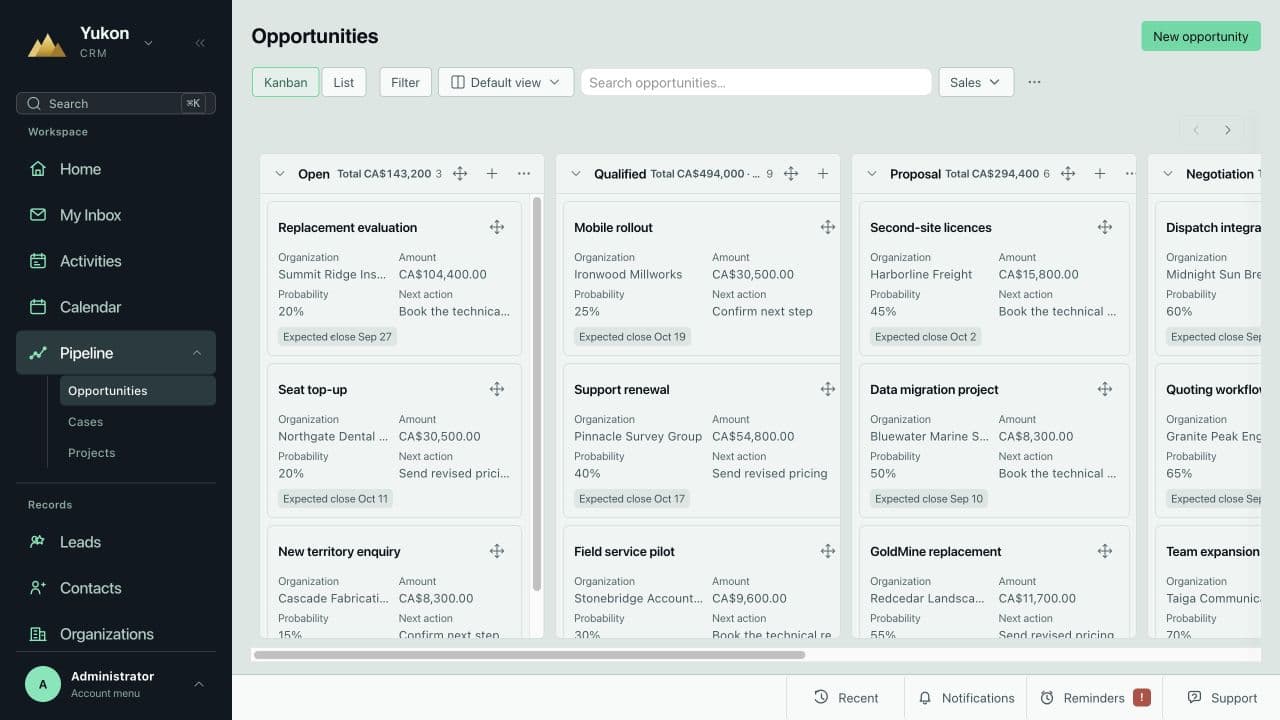
Drag opportunities through stages on a Kanban board or work them as a list. Every card carries amount, probability, expected close, and the next action — so a Monday pipeline review takes minutes, not a spreadsheet export.
- Kanban and list views with saved filters per team
- Stage totals, weighted value, and expected close on every column
- Next action and owner visible without opening the record
Activities & calendar
Calls, meetings, and follow-ups in one working queue.
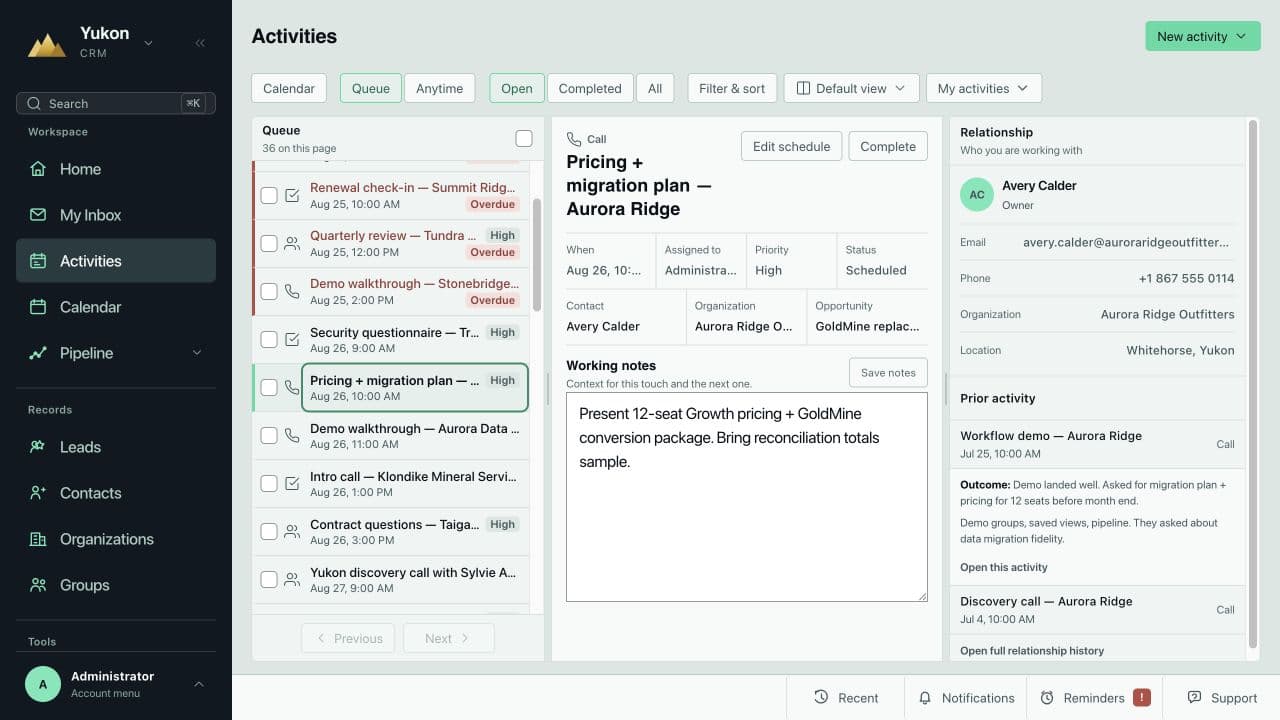
Activities shows what's overdue, what's next, and the relationship context beside it — prior touches, outcomes, working notes. Everything syncs two-way with Outlook and Google Calendar, so nothing is logged twice.
- Queue, calendar, and anytime views for every rep
- Working notes and prior outcomes on the same screen as the call
- Two-way Microsoft 365 / Google calendar and email sync
Accounts & contacts
The whole relationship on one record.
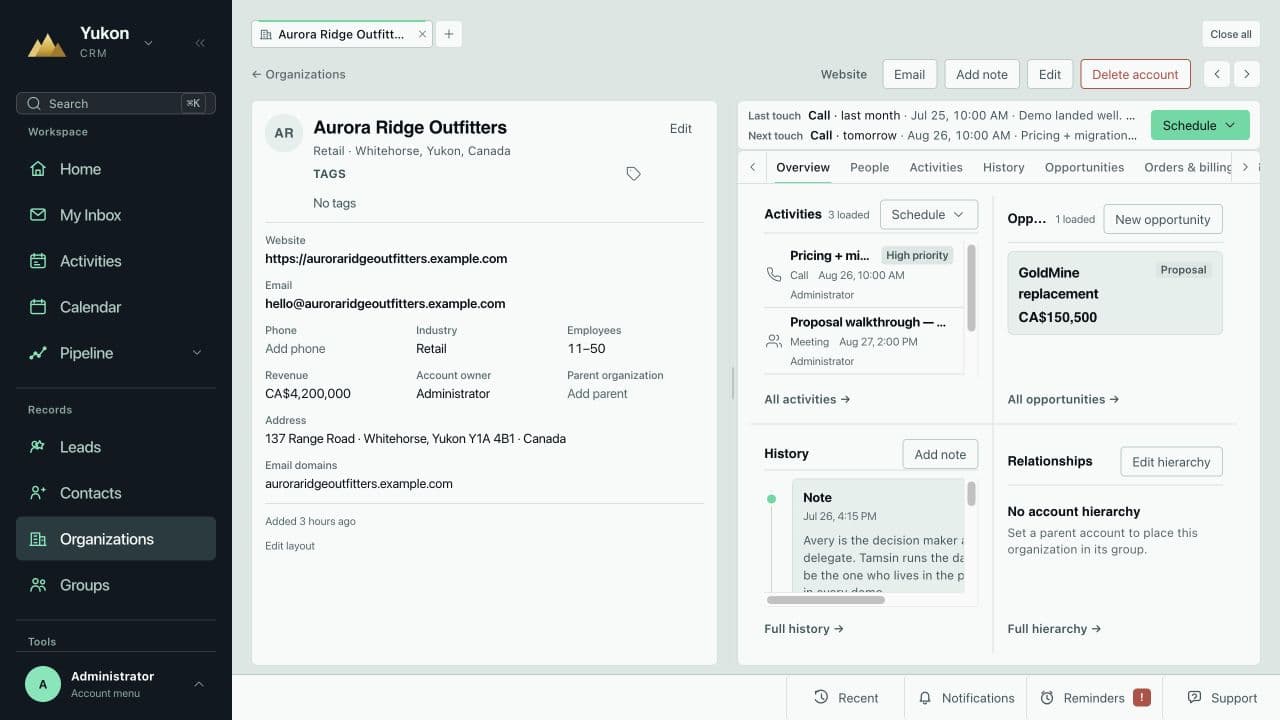
Open an organization and see people, activities, open opportunities, history, orders, and billing on one page — with parent/child hierarchies for multi-site accounts. Last touch and next touch are always at the top.
- Account hierarchies for dealer networks and multi-location clients
- Activity history, notes, opportunities, and orders on one record
- Last touch / next touch surfaced on every account
Everything else is already in the platform.
No Marketing Hub, no invoicing add-on, no separate ticketing tool. Every module reads and writes the same contact record.
Outreach email campaigns
Segment from live CRM data, send, and see opens and clicks on the contact record. Replaces Mailchimp.
SMS campaigns
Text campaigns to segments or one-off messages from the record, with replies logged in the conversation.
Quotes, orders & invoicing
Quotes, sales orders, purchase orders, and invoices on the same platform as the pipeline. Extends to full ERP.
Workflow automation
Stage changes create tasks, sequences run until someone replies, and renewals get reminders before they lapse.
Microsoft 365 & Google sync
Two-way Outlook and Gmail sync. Every email logged against the right contact without anyone remembering to.
Reports & dashboards
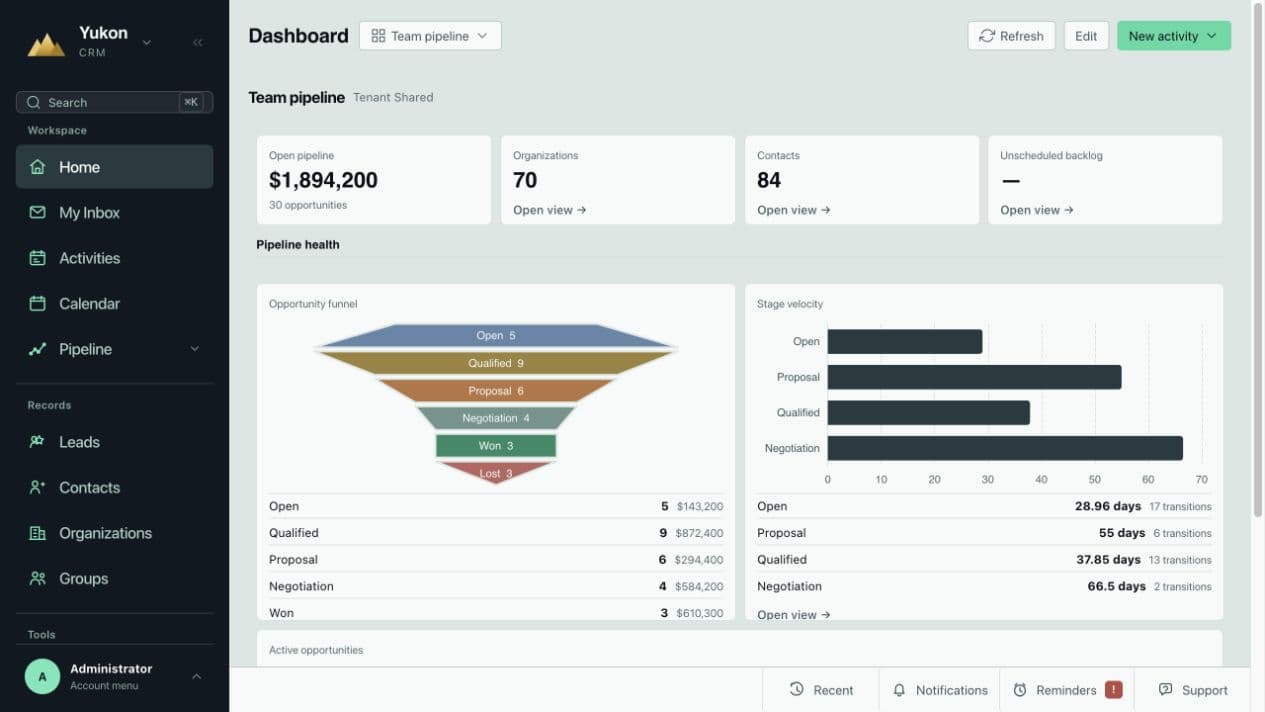
Pipeline health, stage velocity, weighted value, and team activity — live, without a spreadsheet.
Cases & client portal
Support tickets logged against the same accounts sales works, plus a branded portal for documents and invoices.
9,000+ integrations
QuickBooks, phone systems, e-commerce, and vertical software via Zapier, Make, or the REST API.
Cloud, mobile, and yours
No server to maintain, full iOS and Android apps, and your data in storage you own — exportable any time.
Industry editions
Pre-configured for how your industry works.
Each edition ships with the fields, workflows, and automations the industry actually uses — not a blank slate.
Financial Advisors
Client review cycles, AUM and product fields, compliance notes, and renewal tracking — pre-configured.
- Client review & renewal tracking
- AUM and product category fields
- Compliance note logging
- Outlook & calendar sync
Insurance Brokers
Policy and renewal dates, producer pipelines, and automatic expiry reminders — nothing lost between renewals.
- Policy and renewal date tracking
- Producer pipeline management
- Automatic renewal reminders
- Multi-line client histories
B2B Sales & Distribution
Long-cycle deals, account tiers, dealer networks, and stakeholder maps — without enterprise bloat.
- Multi-contact account structures
- Deal stage & pipeline automation
- Account hierarchies and org mapping
- Quote & proposal tracking
Different industry? Every Yukon deployment is configured to your process — book a call and we'll scope it.
Why we built it
One team owns the platform, the migration, and the support.
Most CRMs are rented: your data sits in someone else's cloud, the bill is per-seat licences plus add-ons, and the feature set is whatever the vendor's roadmap decided. After 20 years running business systems for small and mid-size companies, we built our own.
Yukon is developed, hosted, and administered by ETG. You own your data and your storage. Pricing is one number per user. And when your business needs something the platform doesn't do yet, we don't file a ticket with a vendor — we build it.
Book a walkthrough- Your data, your storageEverything exportable, any time, in usable formats. No export fees.
- Configured and administered by ETGNo in-house admin, no partner retainer. We run it.
- Feature requests get builtClient-specific changes land in your setup; platform improvements ship to everyone.
- Managed IT from the same teamDevices, Microsoft 365, security, and help desk — one number to call. Managed IT services.
- Canadian and US hostingData residency options for regulated industries.
Migration
Move from any CRM in 2–4 weeks, without losing a thing.
A generic consultant treats every migration as a discovery project — custom export scripts, hand-tested field mappings, months of hourly billing. We built purpose-built tooling for the platforms teams actually leave: GoldMine, ACT!, Maximizer, Salesforce, HubSpot, Zoho, Pipedrive, and Dynamics.
Coming from GoldMine? That migration is our specialty — see the GoldMine migration page.


- 1We export your data directlyGoldMine, ACT!, Salesforce, HubSpot, Zoho, or spreadsheets — we connect to the source and pull contacts, history, activities, and custom fields.
- 2Field mapping & data cleansingCustom dropdowns, contact categories, account types, and linked records are preserved and translated to Yukon fields.
- 3Your team keeps workingMigration runs in parallel. You stay live on your current CRM until cutover day — no downtime, no data freeze.
- 4Go-live, training, 30-day supportCutover takes a few hours. We train the team, stay available for 30 days, and handle questions as everyone settles in.
How we compare
Yukon CRM vs. the alternatives.
Salesforce and HubSpot rent you seats and charge for everything else. Yukon is one price, every module, and your data stays yours.
| Feature | Yukon CRM | Salesforce | HubSpot |
|---|---|---|---|
| Cloud-native (no server) | ✓Fully cloud | ✓Fully cloud | ✓Fully cloud |
| Full mobile app | ✓iOS & Android | ✓Full app | ✓Full app |
| You own your data & storage | ✓Fully yours | ✗Vendor cloud | ✗Vendor cloud |
| Email + SMS campaigns built in | ✓Included | ~Paid add-ons | ~Paid tiers |
| CRM data migration included | ✓Included | ~Extra cost | ~Extra cost |
| Modern API & integrations | ✓Native + Zapier & API | ✓Extensive | ✓Good selection |
| AI features | ✓Evo AI (add-on) | ✓Einstein AI | ~Basic AI |
| Feature requests actually built | ✓We build them | ✗Roadmap only | ✗Roadmap only |
| Managed IT available | ✓Full ETG stack | ✗Not included | ✗Not included |
| Canadian & US data residency | ✓CA & US colo | ~US-primary | ~US-primary |
| Transparent pricing | ✓Clear per-user | ✗$165–$550/user | ~Scales fast |
Pricing
One price per user. Every module included.
Tiers are capacity, not feature gates. Platform licensing, hosting, configuration, and ongoing administration are all included. Migration is scoped and quoted separately.
Basecamp
The complete platform — every module included from day one
Annual commitment — billed annually
3-user minimum · 100,000 records (contacts, orgs & leads) or 5GB storage · ETG-managed · all licensing & hosting included · migration quoted separately
What's included
Trail
The same full platform, with serious capacity — for data-heavy teams
Annual commitment — billed annually
3-user minimum · 1 million records (contacts, orgs & leads) or 10GB storage · ETG-managed · all licensing & hosting included · migration quoted separately
Everything in Basecamp, plus
Summit
Custom capacity, custom modules, ERP scale — built around your operation
Scoped with you
3-user minimum · custom records & storage · ETG-managed · all licensing & hosting included · migration quoted separately
Everything in Trail, plus
What it replaces
One platform instead of seven subscriptions.
The point-tool stack Yukon replaces
Yukon — the whole stack
The same 5-person team runs about $250/mo — every module above, included.
Prices per user per month, 3-user minimum per instance. Annual plans are 12-month commitments, billed annually. Bundle pricing available with ETG Managed IT. Book a call for exact platform and migration pricing.
Add-on
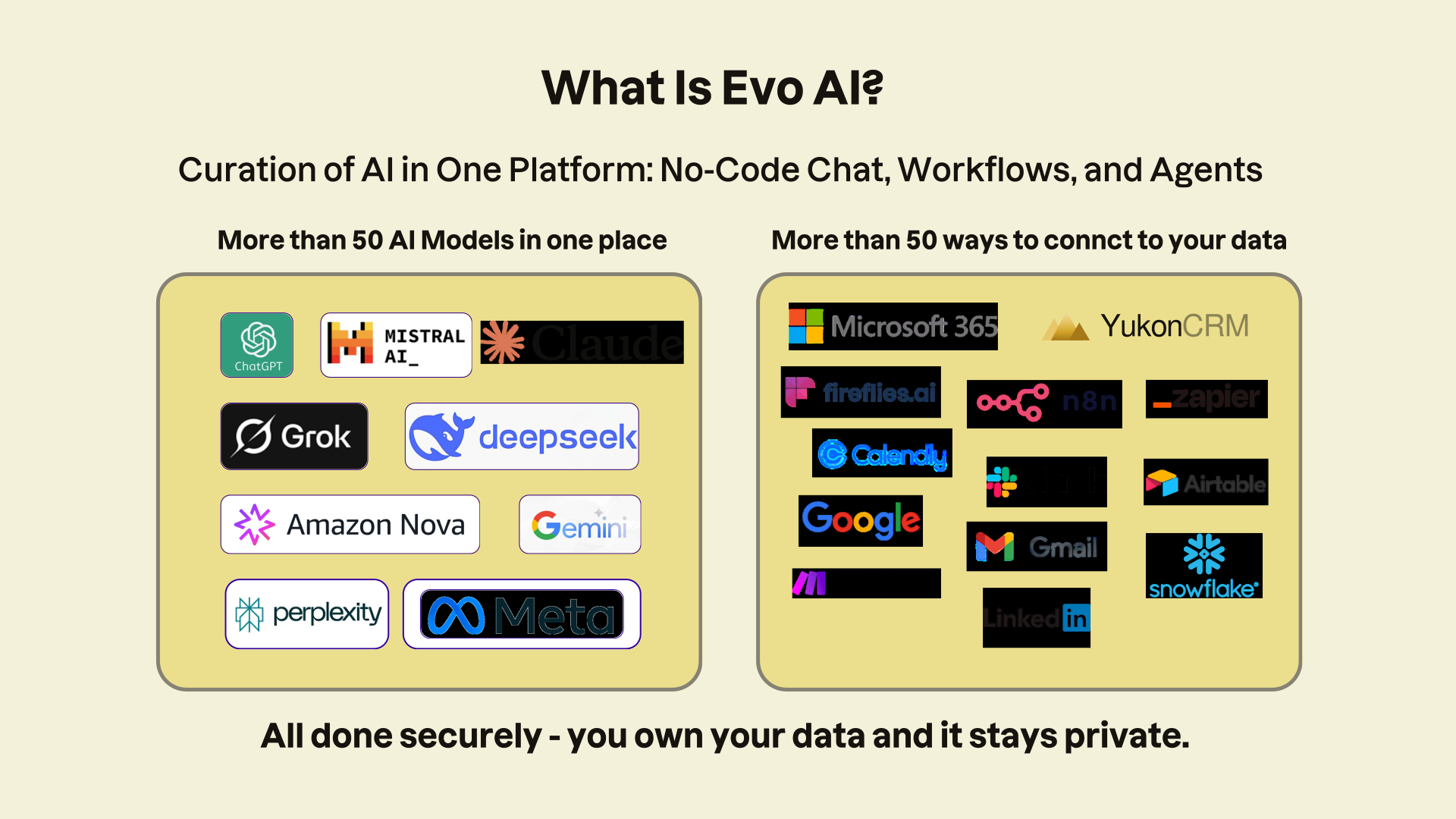
Evo AI works inside Yukon — and across the rest of your business.
An AI assistant and automation layer that reads your CRM, your SOPs, and your connected apps, scoped to the role of the person asking.
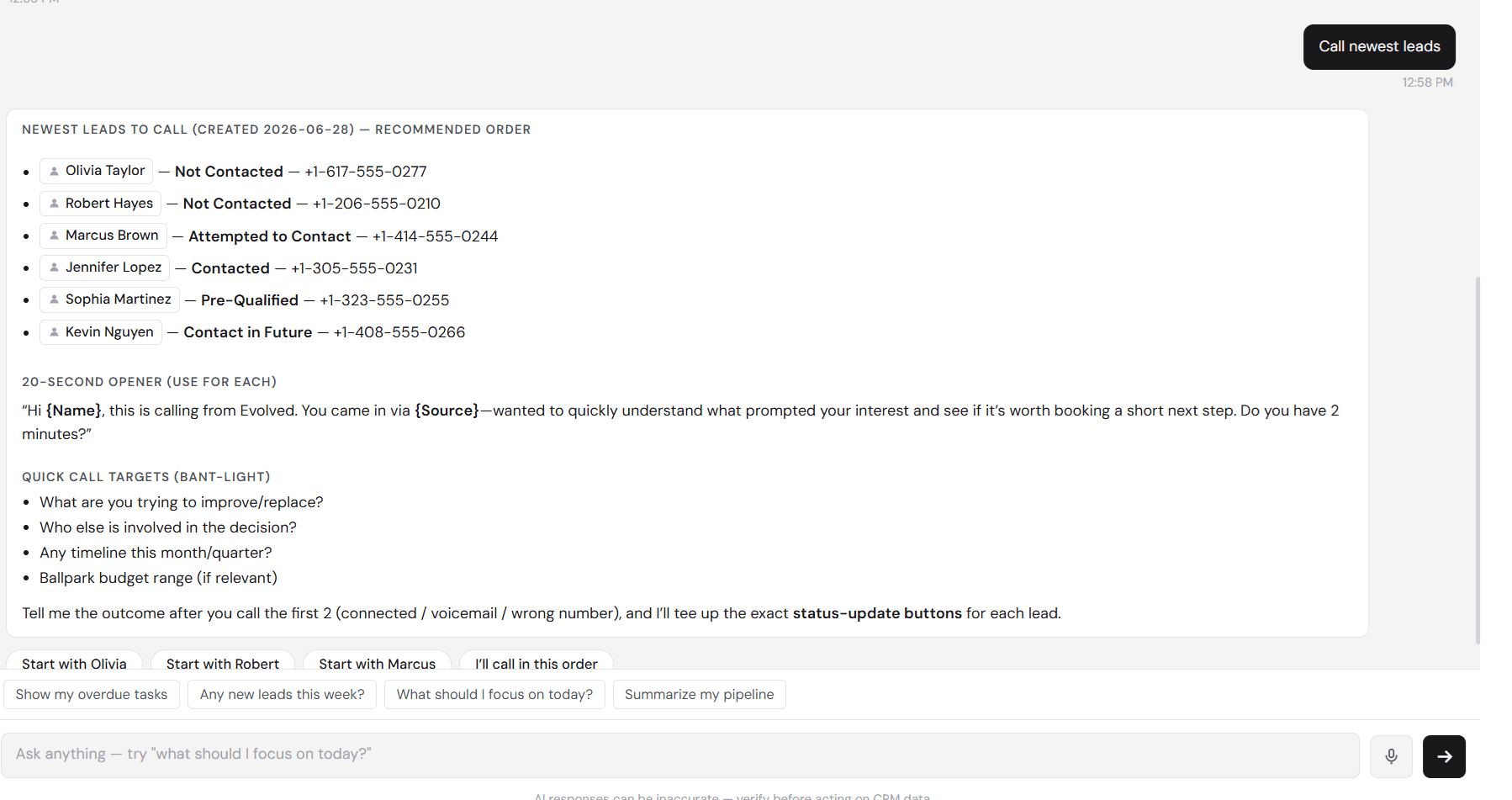
Ask it to queue your calls and it returns a dialing order, an opener, and the questions to ask — pulled from CRM data.
Sales Rep
Chases leads, drafts follow-ups, keeps deals moving.
Sales Manager
Tracks pipeline health and flags where coaching is needed.
Operations
Answers SOP questions and routes exceptions.
AR / AP
Watches invoices and collections before they go overdue.
C-Level
Rolls performance up into the questions leadership asks.
FAQ
Common questions.
Is Yukon CRM built on another vendor's CRM?
No. Yukon CRM is Evolved Technology Group's own platform — we build, host, and maintain it ourselves. That matters in practice: there's no third-party licensing baked into your monthly cost, no outside vendor's roadmap deciding which features you get, and no risk of the platform underneath changing its pricing or terms. When your team needs a capability Yukon doesn't have yet, you're asking the people who write the code — and we build it.
What does “you own your data and your storage” actually mean?
Exactly what it sounds like. Your CRM data lives in storage that belongs to you — not locked inside a vendor's cloud. You can export everything — contacts, history, emails, attachments — at any time, in usable formats. If you ever leave, your data walks out the door with you. No export fees, no hostage negotiation.
What's included beyond core CRM?
Quite a lot. Outreach, the built-in email campaign module, replaces Mailchimp — segments build from live CRM data and every open and click lands back on the contact record. SMS campaigns work the same way. Sales modules cover quotes, sales orders, purchase orders, and invoicing, and the platform extends into full ERP territory when you need inventory, procurement, or finance. Support ticketing, a client portal, and analytics round it out — all reading and writing the same contact record.
Does Yukon integrate with Microsoft 365?
Yes — deeply. Two-way Outlook email and calendar sync means every email is logged against the right contact automatically, and calendar events and tasks flow in both directions. Beyond Microsoft 365, Yukon connects to QuickBooks, your phone system, and 9,000+ apps via Zapier and Make — plus a full REST API for anything custom.
Can you migrate us from our current CRM?
Almost certainly. We've built proprietary migration tooling for GoldMine, ACT!, Maximizer, Salesforce, HubSpot, Zoho, and other platforms — contacts, activity history, emails, custom fields, and documents all transfer. Typical timeline is 2–4 weeks, and your team stays live on the old system until cutover day. GoldMine migrations are a particular specialty — see the dedicated GoldMine migration page.
How does pricing work?
Per user, per month, with a 3-user minimum per instance — and every plan gets the entire platform. Basecamp is $65 USD/user/mo month-to-month or $50 USD/user/mo on an annual commitment, with 100,000 records (contacts, orgs & leads) or 5GB of storage. Trail is $90 USD/user/mo month-to-month or $75 USD/user/mo annual, with 1 million records or 10GB. Summit is custom-quoted for teams that need more capacity, custom modules, or ERP scale. CAD pricing is available too. All platform licensing and hosting is included — no third-party CRM licenses hiding in the bill, no per-feature surprise charges. Bundle pricing is available with ETG Managed IT services, and migration is scoped and quoted separately as a one-time project.
What happens when we need a feature Yukon doesn't have?
We build it. That's the practical difference of running on a platform whose code we own: feature requests go to the people who write the software, not into a vendor's suggestion box. Client-specific customizations are built directly into your setup, and platform-wide improvements ship to everyone continuously.
See Yukon on your own data.
A 30-minute walkthrough — the platform, your migration path, and exact pricing for your team.